| Table of Contents | ||
|---|---|---|
|
Learning CNC Resources
For introductory and general guidance for CNC: Learning CNC Resources
Red Tool Training Class Slides
| View file | ||||
|---|---|---|---|---|
|
Checklist
Long
| View file | ||||
|---|---|---|---|---|
|
Short
| View file | ||||
|---|---|---|---|---|
|
Header and Footer
| View file | ||||
|---|---|---|---|---|
|
Instructions
Cutting Foam
Thanks to Jonathan White :
Think of the sheets of pink/green insulation foam you can buy at the blue or orange hardware store, I did a small project on the EBF yesterday. After angsting about it for awhile, I gave it a shot and 10,000RPM, 150IPM, cutting the full 3/4 deep cut in one pass with an upcut 1/4 endmill, conventional milling, worked perfectly - crisp edges, no burning. The stepover was only 40% which could have been increased to reduce cut time. The only issue was that the bristles on the EBF dust hood scratched the top surface a bit, but this was a functional project so no big deal. That could be avoided by raising the dust hood a little bit.
 ?
?
Clamping System
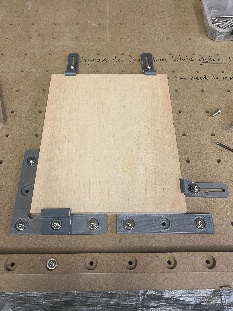
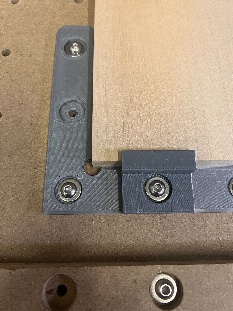
Video of the clamping system: https://drive.google.com/file/d/1OujpILwkB9RfiwdSSosVxea8PkIbwL0b/view?usp=drive_link
Clamping System on Thingiverse: https://www.thingiverse.com/thing:6048725
Surfacing Program
Used with the fly cutter in Slot 8 to surface Slabs. Writes G-Code to do the cutting.
The program is on the Desktop on the EBF computer.
(Contact Jim on slack)
View file name Surfacer Instructions.pdf height 250
Juice Groove
Used for making Juice Grooves in square or rectangular cutting boards (typically).
Writes G-Code to do the cutting.
This program is on the EBF computer.
(Contact Jim on slack)
| View file | ||||
|---|---|---|---|---|
|
Troubleshooting
| View file | ||||
|---|---|---|---|---|
|
Removing a "Stuck Tool"
https://drive.google.com/file/d/15TGpqI7k18v7Pyn-Bp5Rz_cEk6rU7u-w/view?usp=sharing
Air Compressor Timer
The instructions for checking that the timer attached to the air compressor is set correctly are in the instruction sheets. Below is a short video on checking the timer:
https://drive.google.com/file/d/149MomTHKG85XCgpbQfVBixU0eYvqNv2a/view?usp=drive_link
Reservation Policy
Big Blue EBF CNC Reservations (Purcellville)
Reservations should be no longer than 2 hour increments and should not be made back to back. Maximum individual member utilization is 10 hours per week. Reservations should take into account the projected run time and made in a way as to not monopolize the machine. This is a Shared device and all members should be given a fair chance to use the machine.
We realize that some CNC jobs may take significantly longer than 4 hours. This is acceptable as long as you make sure that there is adequate time available giving other members access to the machine.
We ask that you reserve the time you expect to be on the machine, most Gcode generators will give you a good estimate of the time needed.
Be aware that someone with reserved time has priority on the machine. If you are running into their reserved time, they can ask you to stop your job so that they can get on the machine.
It takes Google a full minute to update the reservation calendar. You may need to refresh this page a couple of times before your reservation becomes visible. Please be patient.
Big Blue CNC Classes, Open House, and Private events get first dibs on dates and we will try to block off time for these, please do not try and overlap their hours.
If you need help or have problems, please contact Steward Jim Waldron on SLACK.
All in all, just be polite and clean up after yourself !